Tuesday, April 17, 2018

User names in the sugarcrm.log instead of IDs

So normally the sugarCRM log file is filled with lines like this

Mon Apr 16 07:02:12 2018 [15900][412b8e70-febc-11e6-934a-52d504b662cb][FATAL] No Links found for relationship tasks_activities_1_tasks
Mon Apr 16 07:02:12 2018 [15900][420703ed-f2bc-e3f4-f906-566ef6f1e16d][FATAL] No Links found for relationship accounts_accounts_1
Mon Apr 16 07:02:12 2018 [15900][41a5d4a2-c01b-11e7-88b5-52d504b662cb][FATAL] No Links found for relationship cases_cases_1

Usually I am looking for an entry from a particular user so GUIDs are hard for old human eyes to read.  Even with FIND its a pain.  So I wrote this


This writes out a script and, when run, will rewrite the sugarcrm.log file with user_names instead of IDs.

So to use this you need to
  1. Copy this code to the root SugarCRM directory
  2. run it (php -f updateLog.php)
  3. Update the permissions on the file it creates (chmod 777 updateLog.sh)
  4. Run the script (./updateLog.sh)
Of course this only works on Linux or Mac and maybe the Linux Shell in windows, not sure abou thtat.  But anyway I like it and I hope up do to.

This could also be done in real time by overriding include/SugarLoggger/SugarLogger.php and changing the bit of code that write the line to the log file.  I can show that if anyone needs it, just ask.

Saturday, March 10, 2018

Are your custom fields out of control?

FieldManager 1.0 for MySQL

Every SugarCRM installation I have ever worked on has had the same problem.  Custom fields that are out of control.  There are several problems with Studio when it comes to custom fields.  It really doesnt tailor the field to the data it will contain.
  1. The size option for VARCHARs defaults to 255, for dropdowns it's 100 even though we know the exact size of the data that will fill it.  
  2. It doesnt allow for CHARS.  
  3. Fields that are filled from formulas should have the option to be non-db fields as they are usuaally for display only.  
  4. Too many people use TEXT when a VARCHAR would work fine.  
  5. Fields are created and then never used or fields are abandoned in favor of something new.
  6. Fields are created and then are used for a datatype they are not intended for like using a VARCHAR to hold a date or numeric.
  7. Fields are added and then so rarely used it begs for a redesign.  Maybe there is a checkbox that has never been checked or a dropdown that everyone lets default.

Sunday, January 28, 2018

Developer Centric Logging

A few weeks ago I wrote some posts about overriding the CRON handler and I showed code about Developer Communication.   Since then I have talked to a few people and they all wanted to know what that cryptic function call did so I thought I would look into releasing it.   When I looked at the code I realized that I could not release it as it was crap.  So I took a week and rewrote it into this.  What we have here is a custom logger.  I found scant few examples of custom loggers on the internet so I hope someone finds this useful.

I think it adds all the missing pieces into SugarCRM's SugarLogger function like timers, headers, line tracing, email, and notifications.

Friday, January 19, 2018

Use Rows & Columns reports in Dashlets


I have been thinking about this dashlet for about 7 years.  Its been on my 'to-do' list for probably 4 years.  It found its way to the top of that list January 1st.  I finally coded it this week.  I have been dreading it, the Reports module can be difficult to decode let alone customize.  But, after all of that it was far easier than I had imagined.  I really only had 3 issues.

Monday, January 15, 2018

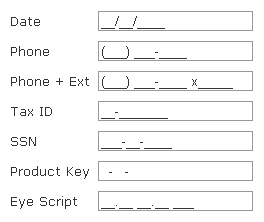
Add a JQuery plugin style to a SugarCRM field - Phone Fields to jQuery-mask

This is the second in a series where I will show ways to add JQuery custom UI elements to SugarCRM views.   This is fairly easy to do for most JQuery plugins.
In this post we are going to use jQuery-mask.  This JQuery plugin will convert normal text fields to masked input fields where the input is dynamically formatted as the user types it in.  For example you can do phone numbers, IP addresses, Money or percents.   It has a few options but in this first part we are just going to stick to the defaults.  First we have to get the plugin loading into SugarCRM.  We could use the JS loader plugin they released a while back but I had issues with that loading the script multiple times so we are going to stick to the tried and true JSGroupings for this one.

Sunday, January 14, 2018

Overriding MysqliManager.php

Overriding the stock SQL Managers


It took me a while to figure out how to override the core MysqliManager class so that I could add some code to email me the SQL errors that usually just go to my logs.  At first I tried just creating the custom file, expecting it to be read like others I had created, but I found that you actually  have to tell the system to use your custom class in the config_override.php file like this

Customizing cron.php

Customize cron.php without replacing the stock file

I wanted to add functionality where I would be emailed if any of the cron jobs failed for any reason.  I found in $sugar_config there is an option to override the cron class that is used to run scheduled jobs and normal cron related things. You can add it to the config_override.php file like this...